Move object(s) to default position |
  
|
Move object(s) to default position |
|
In of this task, the human model brings the object to certain position in relation to its own hip coordinate system. This task can be used to adopt a suitable object carrying posture.
Subordinate tasks:
Move object(s) to target
Parameter |
Type |
Mand. |
Meaning |
|---|---|---|---|
Object to move |
Object |
yes |
An object parameter defining the object to be moved. |
Body movement type |
Selection |
no |
A selection parameter used to select to the upper body motion to be used. |
Target height/ Distance / Transversal position |
Selection |
no |
Several selection parameters that define the relative target height of the selected object in relation to the human model coordinate system and the distance of the selected hand(s) forward or toward the center of the body.
By default, all three parameters are set to automatic, determining an achievable, ergonomically favorable, and collision-free carrying position. The carrying position can be adjusted manually using the additional selection parameters. |
Reference bodypart |
Selection |
no |
A selection parameter specifying a part of the body to which the object is to be moved. Mainly used for putting on/attaching protective clothing. To function correctly, the coordinate system of the part to be put on (e. g. helmet) must be aligned with the coordinate system of the part to be picked up (e. g. head) (see figure Example: reference body part "head" and helmet). |
Target to look at |
Position |
no |
A coordinate parameter representing the point at which the human model will look. |
Change object orientation (both handed only) |
Checkbox |
no |
A decision parameter determining whether the object will be turned during the motion or whether it will maintain its orientation. The parameter has an influence only when the objects are handled with both the hands. |
Local 'object up-direction' |
Selection |
no |
A selection parameter defining the local axis of the handled object which shall be turned “upwards”, if the option “turn object” is active. |
Allow change of grip |
Checkbox |
no |
A decision parameter determining whether the hand or the object need to be manipulated to match the orientation constraint between the placement target and the object. Disabled by default, i.e. once found or manually set grip points are retained in position and orientation. When activated, the ergonomically best possible grab point(s) with the best possible orientation is/are selected at all times during the object movement. |
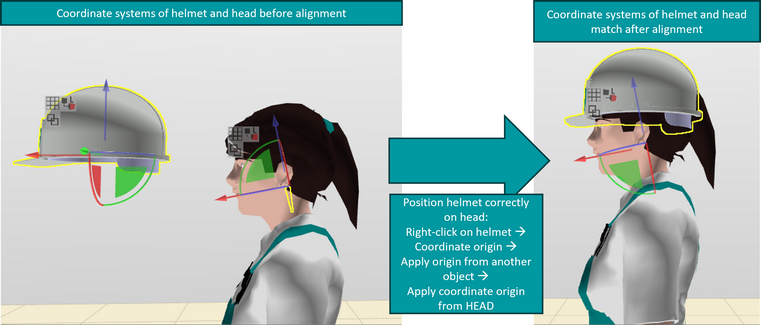
Figure 204: Example: reference body part "head" and helmet